Agrometeo#
[ ]:
from meteostations.clients import agrometeo
The core object of agrometeo-geopy is the AgrometeoClient, which can be instantiated providing a Nominatim query (of a Swiss region) as the region argument as in:
[ ]:
client = agrometeo.AgrometeoClient(region="Canton de Genève")
Alternatively, the region argument may also be provided as:
A list-like with the west, south, east and north bounds
A geopandas geo-series or geo-data frame
A geometric object, e.g., shapely geometry
A filename or URL, a file-like object opened in binary (‘rb’) mode, or a Path object that will be passed to
geopandas.read_file.
Once instantiated, the stations_gdf property features the stations within the region, with its locations and other attributes:
[ ]:
client.stations_gdf.head()
| id | name | lat_dec | long_dec | lat_ch | long_ch | altitude | interval | phone | ... | preview_until | data_until | type_id | owner_id | active | created_at | updated_at | replacement_id | report_url | geometry | ||
|---|---|---|---|---|---|---|---|---|---|---|---|---|---|---|---|---|---|---|---|---|---|
| 29 | 44 | DARDAGNY | 46.1920109 | 5.9808399 | 487462.0 | 116662.0 | 488 | 10 | 079 332 38 36 | domaine.les.hutins@bluewin.ch | ... | 2023-04-30T16:00:00.000000Z | 2023-04-24T01:50:00.000000Z | 3 | 26 | True | 2020-12-14T13:17:18.000000Z | 2023-04-24T00:01:05.000000Z | 45.0 | None | POINT (487462.000 116662.000) |
| 30 | 45 | LA-PLAINE | 46.1828330 | 6.0067971 | 489447.0 | 115605.0 | 360 | 10 | 079 332 32 73 | gegedudu@bluewin.ch | ... | 2023-04-30T16:00:00.000000Z | 2023-04-24T01:50:00.000000Z | 3 | 26 | True | 2020-12-14T13:17:22.000000Z | 2023-04-24T00:01:10.000000Z | 44.0 | None | POINT (489447.000 115605.000) |
| 31 | 46 | SATIGNY | 46.2206561 | 6.0369114 | 491847.0 | 119767.0 | 442 | 10 | 079 332 36 56 | info@champvigny.ch | ... | 2023-04-30T16:00:00.000000Z | 2023-04-24T01:50:00.000000Z | 3 | 27 | True | 2020-12-14T13:17:25.000000Z | 2023-04-24T00:01:16.000000Z | 47.0 | None | POINT (491847.000 119767.000) |
| 32 | 47 | PEISSY | 46.2052881 | 6.0130878 | 489978.0 | 118092.0 | 450 | 10 | 079 332 32 81 | lesvallieres@bluewin.ch | ... | 2023-04-30T16:00:00.000000Z | 2023-04-24T01:50:00.000000Z | 3 | 27 | True | 2020-12-14T13:17:24.000000Z | 2023-04-24T00:01:14.000000Z | 46.0 | None | POINT (489978.000 118092.000) |
| 33 | 48 | ANIERES | 46.2711303 | 6.2229249 | 506285.0 | 125138.0 | 412 | 10 | 079 332 38 89 | vinsvillard@bluewin.ch | ... | 2023-04-30T16:00:00.000000Z | 2023-04-24T01:50:00.000000Z | 3 | 28 | True | 2020-12-14T13:17:14.000000Z | 2023-04-24T00:00:59.000000Z | 71.0 | None | POINT (506285.000 125138.000) |
5 rows × 21 columns
Similarly, the variables_df property features the available variables and its metadata:
[ ]:
client.variables_df.head()
| id | color | default_agg | series_style | decimals | order | aggregations | created_at | updated_at | name.de | name.en | name.fr | name.it | unit.de | unit.en | unit.fr | unit.it | actions.update | actions.delete | |
|---|---|---|---|---|---|---|---|---|---|---|---|---|---|---|---|---|---|---|---|
| 0 | 42 | #167687 | sum | Bar | NaN | 0 | [] | 2021-03-09T00:00:56.000000Z | 2023-04-22T00:00:35.000000Z | Blattnässe III | Leaf wetnessIII | Humectage du feuillage III | Bagnatura fogliare III | ? | ? | ? | ? | False | False |
| 1 | 43 | None | avg | Line | NaN | 0 | [] | 2021-09-11T00:02:00.000000Z | 2023-04-22T00:00:35.000000Z | Spannung interne Lithiumbatterie | Voltage of internal lithium battery | Voltage batterie interne | Tensione batteria al litio interna | Volt | Volt | Volt | Volt | False | False |
| 2 | 1 | #AA0000 | avg | Line | 1.0 | 1 | [{'agg': 'avg', 'label': {'de': 'Temperatur Du... | 2020-12-14T13:17:02.000000Z | 2023-04-22T00:00:36.000000Z | Temperatur 2m über dem Boden | Temperature 2m above ground | Température à +2m | Temperatura a 2m dal suolo | °C | °C | °C | °C | False | False |
| 3 | 4 | #606CB2 | avg | Area | NaN | 2 | [{'agg': 'avg', 'label': {'de': 'Rel. Luftfeuc... | 2020-12-14T13:17:02.000000Z | 2023-04-22T00:00:36.000000Z | relative Luftfeuchtigkeit | Relative humidity | Humidité relative | Umiditá relativa | % | % | % | % | False | False |
| 4 | 6 | #000080 | sum | Bar | 1.0 | 3 | [{'agg': 'sum', 'label': {'de': 'Niederschlag ... | 2020-12-14T13:17:04.000000Z | 2023-04-22T00:00:36.000000Z | Niederschläge | Precipitation | Précipitations | Precipitazioni | mm oder Liter/m2 | mm ou litres/m2 | mm ou litres/m2 | mm ou litres/m2 | False | False |
Given a variable and a time range, the time seres data frame of measurements in the corresponding stations can be obtained with the get_ts_df method as in:
[ ]:
variable = "temperature"
start_date = "2021-08-13"
end_date = "2021-08-16"

ts_df = client.get_ts_df(variable, start_date, end_date)
ts_df
| name | DARDAGNY | LA-PLAINE | SATIGNY | PEISSY | ANIERES | LULLY | LULLIER | BERNEX | TROINEX | MEINIER |
|---|---|---|---|---|---|---|---|---|---|---|
| time | ||||||||||
| 2021-08-13 00:00:00 | 19.3 | 17.8 | 18.5 | 17.9 | 20.6 | 18.4 | 20.3 | 18.6 | 19.4 | 25.8 |
| 2021-08-13 00:10:00 | 19.6 | 17.9 | 18.4 | 17.7 | 20.0 | 18.3 | 19.6 | 18.7 | 19.1 | 28.6 |
| 2021-08-13 00:20:00 | 19.0 | 17.7 | 18.2 | 17.6 | 19.4 | 18.4 | 19.1 | 18.7 | 19.2 | 24.1 |
| 2021-08-13 00:30:00 | 18.3 | 18.0 | 18.1 | 17.4 | 19.1 | 18.3 | 19.1 | 18.6 | 18.9 | 22.5 |
| 2021-08-13 00:40:00 | 18.7 | 18.0 | 18.1 | 17.6 | 19.1 | 18.0 | 19.0 | 18.7 | 18.5 | 21.5 |
| ... | ... | ... | ... | ... | ... | ... | ... | ... | ... | ... |
| 2021-08-16 23:10:00 | 17.5 | 17.8 | 17.3 | 16.9 | 17.9 | 17.6 | 17.3 | 17.2 | 17.9 | 22.2 |
| 2021-08-16 23:20:00 | 17.4 | 17.9 | 17.4 | 17.1 | 17.9 | 17.6 | 17.3 | 17.2 | 18.0 | 22.0 |
| 2021-08-16 23:30:00 | 17.2 | 17.9 | 17.5 | 17.3 | 17.8 | 17.6 | 17.3 | 17.3 | 18.0 | 21.7 |
| 2021-08-16 23:40:00 | 17.2 | 17.9 | 17.7 | 17.1 | 17.7 | 17.4 | 17.2 | 17.1 | 18.1 | 21.9 |
| 2021-08-16 23:50:00 | 17.1 | 17.8 | 17.5 | 17.1 | 17.7 | 17.3 | 17.1 | 17.1 | 18.1 | 22.0 |
576 rows × 10 columns
The variable argument can be either: - an agrometeo variable code (integer or string) - see the variables_df property above - an essential climate variable (ECV) following the meteostations-geopy nomenclature (string) - an agrometeo variable name (string) - see the variables_df property above
The returned object is a pandas data frame upon which we can operate using any of its supported functions, e.g.:
[ ]:
ts_df.resample("H").mean().plot()
<Axes: xlabel='time'>
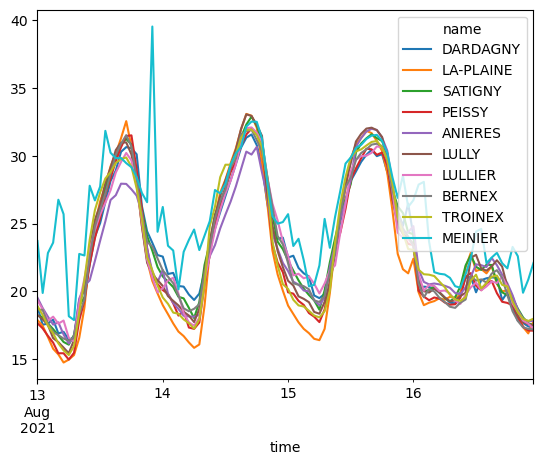
We can also use the get_ts_gdf method to include the locations of the stations along with the time series of measurements as in:
[ ]:
ts_gdf = client.get_ts_gdf(variable, start_date, end_date)
ts_gdf
| time | 2021-08-13 00:00:00 | 2021-08-13 00:10:00 | 2021-08-13 00:20:00 | 2021-08-13 00:30:00 | 2021-08-13 00:40:00 | 2021-08-13 00:50:00 | 2021-08-13 01:00:00 | 2021-08-13 01:10:00 | 2021-08-13 01:20:00 | 2021-08-13 01:30:00 | ... | 2021-08-16 22:30:00 | 2021-08-16 22:40:00 | 2021-08-16 22:50:00 | 2021-08-16 23:00:00 | 2021-08-16 23:10:00 | 2021-08-16 23:20:00 | 2021-08-16 23:30:00 | 2021-08-16 23:40:00 | 2021-08-16 23:50:00 | geometry |
|---|---|---|---|---|---|---|---|---|---|---|---|---|---|---|---|---|---|---|---|---|---|
| name | |||||||||||||||||||||
| DARDAGNY | 19.3 | 19.6 | 19.0 | 18.3 | 18.7 | 18.2 | 17.9 | 17.6 | 17.5 | 17.4 | ... | 17.5 | 17.3 | 17.4 | 17.5 | 17.5 | 17.4 | 17.2 | 17.2 | 17.1 | POINT (487462.000 116662.000) |
| LA-PLAINE | 17.8 | 17.9 | 17.7 | 18.0 | 18.0 | 17.9 | 17.9 | 17.7 | 17.6 | 17.2 | ... | 16.9 | 16.9 | 16.8 | 17.4 | 17.8 | 17.9 | 17.9 | 17.9 | 17.8 | POINT (489447.000 115605.000) |
| SATIGNY | 18.5 | 18.4 | 18.2 | 18.1 | 18.1 | 17.9 | 17.9 | 17.9 | 18.0 | 18.7 | ... | 17.6 | 17.5 | 17.6 | 17.6 | 17.3 | 17.4 | 17.5 | 17.7 | 17.5 | POINT (491847.000 119767.000) |
| PEISSY | 17.9 | 17.7 | 17.6 | 17.4 | 17.6 | 17.7 | 17.6 | 17.5 | 17.2 | 17.0 | ... | 17.1 | 17.2 | 17.3 | 17.1 | 16.9 | 17.1 | 17.3 | 17.1 | 17.1 | POINT (489978.000 118092.000) |
| ANIERES | 20.6 | 20.0 | 19.4 | 19.1 | 19.1 | 19.0 | 18.9 | 18.9 | 18.9 | 18.8 | ... | 17.7 | 17.7 | 17.9 | 17.9 | 17.9 | 17.9 | 17.8 | 17.7 | 17.7 | POINT (506285.000 125138.000) |
| LULLY | 18.4 | 18.3 | 18.4 | 18.3 | 18.0 | 18.2 | 18.2 | 18.0 | 17.8 | 17.7 | ... | 17.5 | 17.5 | 17.6 | 17.6 | 17.6 | 17.6 | 17.6 | 17.4 | 17.3 | POINT (494821.000 113788.000) |
| LULLIER | 20.3 | 19.6 | 19.1 | 19.1 | 19.0 | 18.9 | 19.1 | 19.2 | 18.9 | 18.7 | ... | 17.5 | 17.6 | 17.5 | 17.3 | 17.3 | 17.3 | 17.3 | 17.2 | 17.1 | POINT (508630.000 119651.000) |
| BERNEX | 18.6 | 18.7 | 18.7 | 18.6 | 18.7 | 18.7 | 18.8 | 19.1 | 18.8 | 18.5 | ... | 17.4 | 17.3 | 17.2 | 17.2 | 17.2 | 17.2 | 17.3 | 17.1 | 17.1 | POINT (493900.000 114060.000) |
| TROINEX | 19.4 | 19.1 | 19.2 | 18.9 | 18.5 | 18.4 | 18.4 | 18.6 | 18.4 | 18.1 | ... | 17.9 | 17.6 | 17.6 | 17.8 | 17.9 | 18.0 | 18.0 | 18.1 | 18.1 | POINT (500520.000 112865.000) |
| MEINIER | 25.8 | 28.6 | 24.1 | 22.5 | 21.5 | 19.8 | 19.8 | 20.7 | 20.4 | 19.6 | ... | 21.1 | 21.2 | 22.7 | 22.8 | 22.2 | 22.0 | 21.7 | 21.9 | 22.0 | POINT (506270.000 122120.000) |
10 rows × 577 columns
TODO: We can then use the plot_temperature_map method to plot a map of the temperature measurements at a given point in time provided as the dt argument:
[ ]:
# TODO:
# plot_temperature_map(
#     ts_gdf,
#     dt=datetime(year=2021, month=8, day=15, hour=21),
#     plot_kws=dict(edgecolors="black"),
# )